Showing posts with label application. Show all posts

Tuesday, November 4, 2014

Top 10 FREE iOS 8 Tweaks – iOS 8 Compatible

So you’ve jailbroken your device, now what? There are an incredible amount of tweaks you can install, here are 10 more really great iOS 8 tweaks that happen to also be free. These not only spruce up the look of iOS 8 on your device, they also improve functionality and introduce new cleaver features not found in iOS 8. These all work great and I have not experience any instability when running them on my iPhone 6. I would recommend you be updated on the latest iOS 8.1 firmware to run these iOS 8 tweaks.
So here’s the list. 

1 .CCSetting : CCsetting is well known tweak for iOS 7 And Now it is updated to work on iOS 8 . It add several More toggles to your Control Center.


2. SaveGram : Save posts from Instagram. Adds a simple "Save" option when selecting a post. After tapping Save, you'll find the picture or video you chose in your Camera Roll. Currently guaranteed to support Instagram 5.0.8-6.0.1
Fully compatible with all iOS 8 devices.


3. Mobius. Ripped straight from Android, this is an iOS 8 tweaks that allows you to swipe infinitely between pages. Mobius needs the following source to be installed: “repo.tylercasson.com”

4. Live Battery Indicator iOS 7. Very similar to the iOS 8 Tweaks “Alkaline”. Many different choices to alter your stock iOS 8 battery indicator.

5. Cylinder. A really cool iOS 8 Tweaks, allows you to change the swipe animation on your iPhone. Many more choices to choose from than the similar iOS 8 tweak known as “Barrel”

6. ClassicDock : With ClassicDock, you can bring back the iOS 6 dock in iOS 7! Install and never look at that iOS 7 dock again!<br>

7. BytaFont 2. Change system font. Huge selection of fonts.

8. Flurry. Changes the look and transparency of the notifications center, command center and many other areas of iOS 8.

9. UntetheredHeySiri. This tweak basically allows you to use the new iOS 8 functionality of summoning siri when connected to a power source without needing to press the home button just be saying “Hey Siri” while note being plugged into a power source. Say you are driving and don’t need to be distracted, very useful.

10. Power Tap. When you hold the power button and get the drop down menu to shut down your device, you can now tap the power icon and use new functionality. One tap is to reboot your device, two is to respring. Very useful tweak to have if you will be installing many iOS 8 tweaks or applications as not many of them are updated to support iOS 8 and need to be resprung for any change to take effect.

Well, that’s it those were my top 10 more iOS 8 tweaks that are free, enjoy them!

Thursday, October 30, 2014

Cydia Installer updated to 1.1.15 to fix passcode issue, adds multitasking, iPhone 6 support, and much more


Cydia Installer just received a 1.1.15 update to fix the lingering passcode issue. You can now update Cydia on your jailbroken iOS 8 device and use a passcode without any side effects.
More impressively, perhaps, is the introduction of new multitasking capability! Yes, true multitasking with Cydia is finally here if you’re jailbroken with iOS 8. Amazing.
Then, there’s support for the iPhone 6 Plus! That includes rotation support.


What's new in cydia 1.1.15


  • Correct rotation to only on tablets to match Apple's UI style guidelines.
  • Make Installed tab icon consistent.
  • incompatibility with cache wipers (such as iCleaner) that cause Cydia to crash when you try to run it after.


  • - Changes in Cydia 1.1.14
    iOS 8 Passcode Compatibility
    Cydia no longer causes your device to lock up while booting on iOS 8 when you use a passcode. We recommend you use a passcode for security. (Under Settings, go to "Touch ID & Passcode", and "Turn Passcode On".)
    If you have installed unsupported stashing modifications, you may want to restore and jailbreak again, instead of directly installing this update (those modifications are unsupported).
    Multitasking Support on iOS 8
    Cydia now backgrounds almost like a regular application (but only on iOS 8). This has been a major architectural change: please alert us to any issues.
    This allows you to switch back/forth between Cydia and other applications (such as Safari, or the Google two-factor authentication app) without losing your package selection state.
    New Window and Hijack Blocking
    One of the biggest complaints about Cydia in the last year has been a new kind of ad seen on some repositories: a sudden redirect to the App Store.
    Cydia now blocks "popups" and asks the user before opening the App Store.
    Partial iPhone 6 Plus Support
    Cydia supports rotation on the iPhone 6 Plus and has a new @3x icon and tabbar. Cydia renders at the native resolution on both the 6 and 6 Plus.
    Videos Work Again (on iOS 7.1-8.1)
    Cydia on iOS 7.1 had an issue where playing video would cause the device to "lock up". This bug has finally been fixed! The new iOS 8 video issue (a YouTube error message) is also fixed.
    Localization Works Now on iOS 8
    Users of Cydia 1.1.13 (only available via a manual installation process) may have noticed Cydia only displayed in English :(. This has been fixed! Yay!
    Queue Status is "Less Incorrect"
    Sometimes Cydia would not have packages queued but claim it did, or would have packages queued and claim it did not; this happens less ;P.
    Known Issues Specific to iOS 8
    When installing packages that put icons on SpringBoard, the icons may not appear. Rebooting might make them appear. This is because our "uicache" tool, which refreshes icons, has not yet been updated for iOS 8.
    We are working on this, and a fix will come later as part of the UIKit Tools package as soon as we can manage.
    If you need to install it directly (such as if you've jailbroken and haven't installed Cydia yet):http://apt.saurik.com/debs/cydia_1.1.14_iphoneos-arm.deb

    Biggest Cydia update ever? Saurik really went all out with this one! He’s accepting donations via the Cydia Installer page. Sound off in the comments with your thoughts.


    Tuesday, October 14, 2014

    How To Install All Paid Apps/Games For Free without jailbreak on your iOS 8 / iOS 7 iDevices

    What is vShare app? How can it help you to download paid apps for free?

    vShare is an excellent iOS app that is first of its kind to support jail-broken and non-jail-broken devices. The new flat interface of the app is very clean, user-friendly and is promising to give the best user experience. The apps in vShare are updated regularly and you can always get the newest paid app here.

    Wednesday, September 17, 2014

    Mcent : Earn Free Recharges For Downloading Apps From Playstore

    Everyone Wants Free Mobile Recharge in his Android phone.There is a  app in android play store that can free recharge in your phone. This app name Mcent With the help of Mcent you can earn free recharge very fast and easily.


    Saturday, September 13, 2014

    WAEnhancer Cydia Tweak for whatsapp gives you the ability to use themost popular message app as you like.

    WhatsApp Messenger is no doubt one of the most popular instant messaging client now owned by Facebook. What started with a mere group of members, has now over 500 million+ users worldwide, and the number keeps increasing exponentially everyday. 


    WAEnhancer for iPhone is a jailbreak oriented tweak which adds multiple out of the box features to your Whatsapp account.
    WAEnhancer tweak brings some really useful functionalities that includes the Freeze LastSeen feature, which prevents the app from updating your ‘Last Seen’ status even if you have it turned on from app’s settings. The tweak has the ‘Read Receipts’ feature that prevents others from knowing that you have received as well as read their message.

    Monday, September 8, 2014

    Whatsapp Recently got updated to 2.11.11 with Improved chat search and Bug fixes


    For those who do not know about Whatsapp , WhatsApp Messenger is a proprietary, cross-platform instant messaging subscription service for smartphones and selected feature phones that uses the internet for communication. In addition to text messaging, users can send each other images, video, and audio media messages as well as their location using integrated mapping features.

    Wednesday, September 3, 2014

    Get Free ₹ 150 Recharge With WECHAT App


    WeChat  is a mobile text and voice messaging communication service developed by Tencent in China, first released in January 2011.It is the largest standalone messaging app by monthly active users.
    The app is available on Android, iPhone, BlackBerry, Windows Phone and Symbian phones, and there are also Web-based and OS X clients but these require the user to have the app installed on a supported mobile phone for authentication. As of 2013, WeChat has 300 million users; with 70 million outside of China.

    The popular Chinese Messaging application again introduced free Talktime of Rs. 150, Previously they offered a total of Rs.60 


    How to Get ₹150 :


    • First Install Wechat App ( Android Link || iOS Link || Blackberry Link|| Windows Link|| Symbian phones Link)
    • Register If you are a fresh user
    • Sign-In to Wechat app
    • Now From 1st sep to 10th sep , You have to make voice/video calls daily to any of your friends.( NOTE : Voice/video calls must be longer than 1 min )
    • Now From 11th sep to 20th sep, Create any group and start a Sending Stickers.
    • Do the same process for 20 Day [You need to send Message daily]
    • Nothing Much to Explain you all are good enough in these offers , yet any queries leave comment below.

    Notes.
    Don’t worry if you miss a day. Continue sending stickers and you will still earn free talktime.
    The Talktime redemption link will be shared with you after 22th september
    Only  Indian Mobile registered users

    Wednesday, August 27, 2014

    SwipeExpander lets users add shortcut to their Keyboards

    SwipeExpander tweak allows users to insert any text, perform an action, or reveal a menu of actions by swiping up or down on any key on the keyboard. You can customize almost every key. Keys can be configured to display as lowercase when using the lowercase keyboard and to show custom names above each character. Some of the additional features include select, cut, copy, paste, inserting the last saved photo, opening Control Center, defining a word, and many others.

    SwipeExpander is Developed By Jerry En.

    Features :

     - Insert any text
     - perform an action, or reveal a menu of actions by swiping up or down on any key on the keyboarD
     - Actions include select, cut, copy, paste
     - inserting the last saved photo
     - opening Control Center 
     - defining a word
     - and many others


    What’s new in SwipeExpander version v-1.3.2
     Reduced size of iPad preview text
     Adjusted sensitivity settings
     Support animated GIFs with Insert Last Photo action


    Download SwipeExpander available in Cydia via the BigBoss Repo for $2.50 and its supports iOS 7  .


    Grabby Brings Quick and stylish access to apps from the camera grabber.


    For those of you who didn’t know, Grabby tweak brings quick and stylish access to apps from the camera grabber. From here, you can select the application that will open from the Camera grabber, the Music grabber, the Phone grabber, and the Messages grabber.

    Using Grabby tweak  Users can swipe up on the grabbers to launch the app or perform the action right from the lockscreen without even unlocking their device. After install this tweak you can configure it through the Settings application. You change the number of icons you want to show, assign a different icon to grabbers and configure which actions should require passcode and which ones shouldn’t.

    panicLockPro locks apps on your iDevice via an Activator gesture

    Nosy Roommates , Friends ? Getting robbed and don't want the thief to make away with your private data? if you answered yes to any of these questions, you should probably check out a tweak called panicLockPro that secures the private data on your iPhone or iPad.
    With panicLockPro, you can quickly lock applications via an Activator gesture and secretly protect the private data on your iOS device. The tweak allows you to select individual apps that you want to lock out and prevent unauthorized access to.

    Wednesday, August 20, 2014

    Get Free ₹ 120 Recharge With LINE App

    How to Get ₹120 :

    The popular Japanese Messaging application again introduced free Talktime of Rs. 120, Previously they offered a total of Rs.130  .


    • First Install Line App ( Android Link || iOS Link)
    • Register If you are a fresh user
    • Sign-In to Line app
    • Create any group and start a Sending Stickers.
    • Do the same process for 20 Day [You need to send Message daily]
    • Nothing Much to Explain you all are good enough in these offers , yet any queries leave comment below.
    Notes.
    Don’t worry if you miss a day. Continue sending stickers and you will still earn free talktime.
    The Talktime redemption link will be shared with you every 5 days
    Only for Android / iOS Indian Mobile registered users


    Tuesday, August 19, 2014

    Ignore No More app gives you control over your children's phones

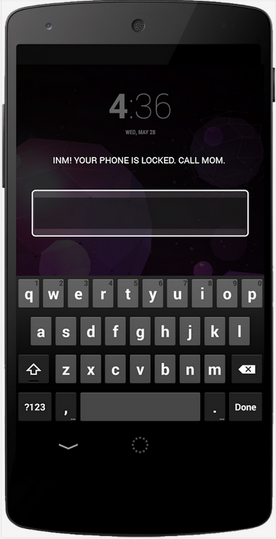
    Ignore No More is an easy to install app that gives you control over your children's phones. If your children ignore your repeated calls and text messages to reach them, you simply lock their phones until they call you back.Ignore No More is a  Great concept which definitely needs some security fixes


    Ignore No More Is Developed By Mountaineer Technology Ventures, LLC


    Features:

    1. Easy to Install
    2. Be up-and-running in less than 10 minutes.
    3. Single Household Account
        One account controls multiple "child" devices from multiple "parent" devices
    4. Cannot be Disabled
    5. Virtually impossible to be removed by your child.
    6. ICE Enabled
    7. Does not interfere with ICE or First Responder calls


    GETTING STARTED


    PARENT DEVICE SET-UP

    1. Before installing Ignore No More on any device, it is important to back-up the device. A clean back-up will allow you to restore your device.

    2. From the first parent's phone, download and install Ignore No More from Google Play. Locate the Ignore No More launch icon and click it.

    3. If you have never created an Ignore No More household account, click "Create Parent Account." If you have created an Ignore No More account, enter your username/email and password, then click login. You only need 1 household account per family. Be sure to write down your household login information as you will use this account and it's login information to set up, control, and monitor all devices from your parent device.

    4. Complete the "Create Account" form, be sure to enter a valid email account and an 8 or more character password. Once complete click "submit."

    5. Congratulations, your first parent phone is set-up. Repeat steps 1-5 for any additional parents. Note, do not create a new household account. Login with your newly created household account.

    CHILD DEVICE SET-UP

    6. Now that all parent devices are set-up you are ready to install Ignore No More on your children's devices. First install Ignore No More and login with your household account username/email and password.

    7. Next, select register this device as a "Child." When prompted enter the first and last name of the child whose device you are registering.

    8. In order for Ignore No More to control your child's device you must give Ignore No More permission to be a device administrator. When prompted click "Activate." Now Ignore No More can control your child's device remotely.

    9. Congratulations, Ignore No More is now installed on your child's device. Now from your parent device click the refresh button in the top action bar and you should see your child's device listed. There are a few additional steps required for your child to be able to call you when their device is locked. It is very IMPORTANT not to skip the last few steps.

    10. Finally, navigate to "Contacts" on your child's device and launch it. Click on the "Groups" tab and find "ICE - emergency contacts." Now add contacts to that group. Any contact you add to "ICE - emergency contacts" will be available for your child to call when their device is locked. Repeat steps 6-10 for any additional child devices.


    What’s new in Ignore No More   v-1
     -Improved Performance: All devices

      Added: Notification for Rooted Devices
      Bug Fix: for start-up crashes
      Bug Fix: for lock screen widget could not make outgoing calls
      Bug Fix: for Galaxy Note2 and Galaxy S3 crashes


    Ignore No More  is available now as $1.99 download from Play Store Download iT From Here 
    .Give it a try.


    Thursday, August 7, 2014

    Solve Camera: An App Store App For Taking Pictures Discreetly


    This app has a really cool concept! First of all the app size is really tiny. It has an auto dark and light mode too! What more can you ask? It does a pretty good work with clicking pictures.

    A popular jailbreak developer named Raviraj Minawala (ravirajm) has released a new application in the iOS App Store called Solve Camera, which allows you to take a photograph without being noticed by everyone around you.


    You will find two buttons in the interface – one says "Solve" and the other says "selfie." 

    The selfie button allows you to switch between the front-facing camera and the rear-facing camera, and the Solve button allows you to snap a photograph. When you have selfie mode enabled, the button glows yellow, but when it's disabled, the button is dimmed out. When you snap a photograph, text appears at the bottom of the application that says, "Saved to Camera Roll" and then it quickly disappears.


    Description


    There’s always a moment, a dish, a person that you want to capture. You cannot always pull out your phone’s camera because people looking at you will give you that ‘awkward feeling’. 

    Introducing ‘Solve’. This app will solve all your picture-taking problems. 
    Now, you don’t have to be shy before clicking a picture of that delicious meal you ordered! Or that awkward selfie which you don’t want to miss out on!

    Just boarded the plane and need a quick selfie? Now you can ignore the other passengers and Solve a selfie without them even noticing! 

    You don’t need to feel conscious anymore. Just hit that ‘Solve’ button and fill your camera roll! 

    Act like you’re reading the app but who knows that you’re taking a selfie!? Who knows you’re capturing that bottle of beer!? 

    Solve is freedom for you. Solve is an all new way of clicking pictures. Your new tool. Your new shyness-killer. 

    Start Solving today!

    Note: the shutter sound will still be heard unless you switch your device to silent mode.


    What’s new in Solve Camera version v-1.0

    - inital release


    Saturday, July 19, 2014

    Get Free ₹ 130 Recharge With LINE App .

    Line App
    Description
    There are no limits! Call and send messages as much as you want!
    LINE is a new communication app that allows you to make FREE voice calls and send FREE messages whenever and wherever you are, 24 hours a day!

    Friday, July 18, 2014

    Final Kick: The best penalty shootout game


    Description

    Enjoy the tense moments of the penalty shots as if you were playing in a Football final, competing against the best teams, making the most spectacular goals and saves and along with graphics that will make you feel as if you were actually in the match. Perfect your special shots, shoot with special effects, fool your opponent and make the most impressive saves, controlling the ball with one finger, and become the World Champion.

    Thursday, July 17, 2014

    Hike, The Messaging App Review And Quick Comparison between Whatsapp vs Hike


    The latest entrant in this genre is Hike, a communication app that offers both instant messaging and SMS under one roof. Developed by Bharti Softbank, a 50-50 partnership between India's Bharti Telecom and Japan's Softbank telecom provider, the app is the brainchild of Kavin Bharti Mittal.

    Friday, July 11, 2014

    Nike releases new Soccer App and it’s one that brings everything soccer to your fingers


    It’s interesting that although Adidas is the official sponsor of the world’s greatest sporting spectacle that is the 2014 World Cup in Brazil,Nike’s created a new app that brings to you everything the game has to offer, and it’s in your control.

    AfterLight - Afterlight: Simple, Subtle Photo Editing Brilliance


    Afterlight is the perfect image editing app for quick and straight forward editing. Our simple design, paired with powerful and snappy tools, will give you the look you want in seconds.

    PROS
    Exposure adjustments. Loads of effect options. Cropping. Cutouts. Lots of sharing options.

    Thursday, July 10, 2014

    Assassin's Creed Pirates is the Free Apple's App of the Week


    Ubisoft's Assassin's Creed Pirates has been named Apple's app of the week, and as a result, it's available for free for the first time since it debuted on the App Store back in December of 2013. 

    Assassin's Creed: Pirates is a spin-off game for smartphones and tablets developed by Ubisoft Paris. The game follows thepirate, Alonzo Batilla, who holds the key to finding the treasure of the French pirate La Buse. The game focuses on naval combat and is set in the 18th century, similar to Assassin's Creed IV: Black Flag.

    Tuesday, July 8, 2014

    Ladooo - Free Mobile Recharge Android App


    Everyone Wants Free Mobile Recharge in his Android phone.There is a  app in android play store that can free recharge in your phone. This app name Ladooo. With the help of ladoo you can earn free recharge very fast and easily.